¶ Sibly Webmail - Quick Start Guide
Welcome to Sibly Webmail.
This guide will help you get started with your email account, manage your inbox, send messages, organize contacts, and customize your settings.
¶ Logging In
To access your mailbox, open your web browser and navigate to:
https://webmail.sibly.pro
Enter:
- Your email address
- Your password
Click Log in.
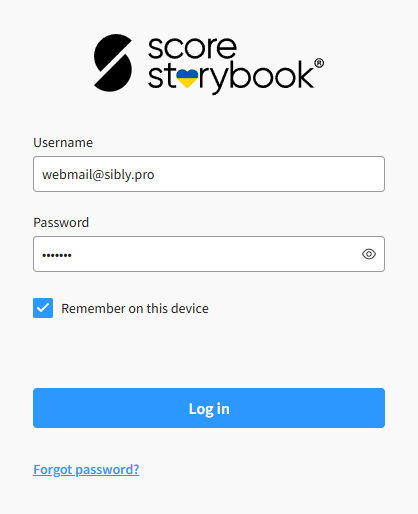
If you have forgotten your password, please contact us.
¶ Overview of the Interface
After signing in, you will see the main Sibly Webmail interface.
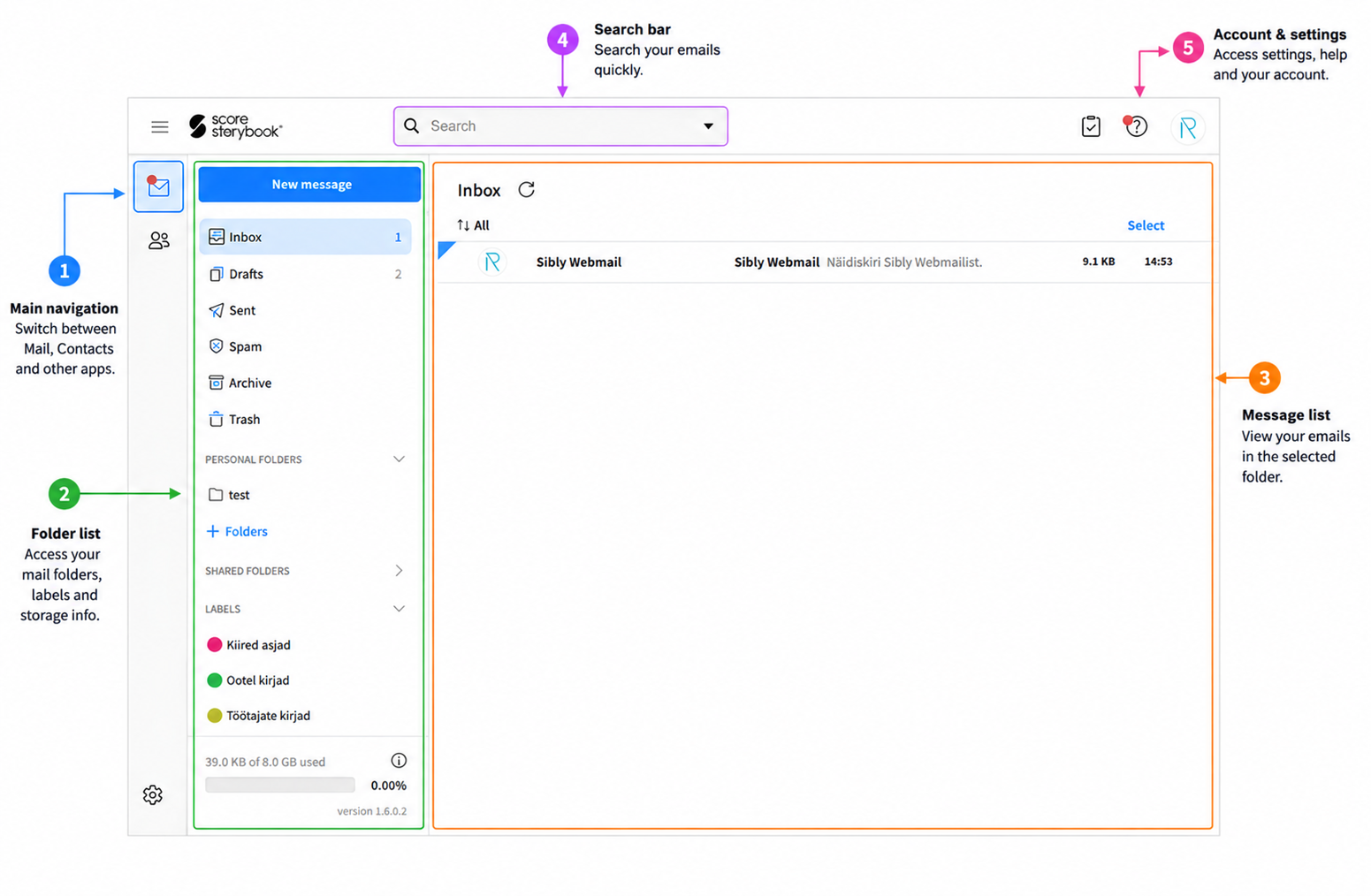
The interface consists of:
- Main navigation
- Folder list
- Message list
- Search bar
- Account & settings
For detailed information about changing interface layouts see Changing the Email Application Layout
¶ Reading Email
Click any message in your Inbox to view it.
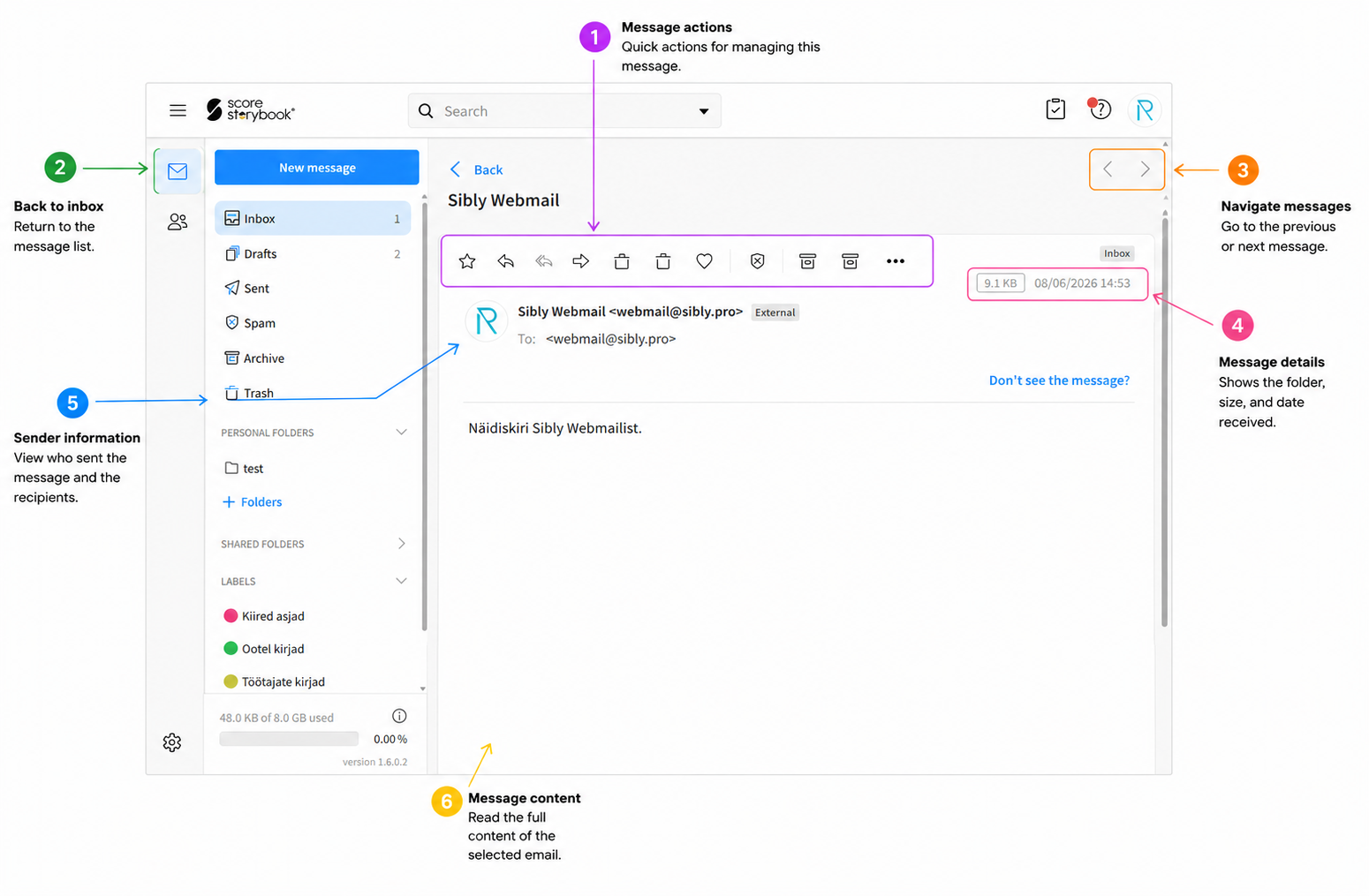
Available actions include:
- Favourite
- Reply
- Reply All
- Forward
- Delete
- Quick Answer
- Mark as Spam
- Arvhice
- Move to Folder
¶ Sending Your First Email
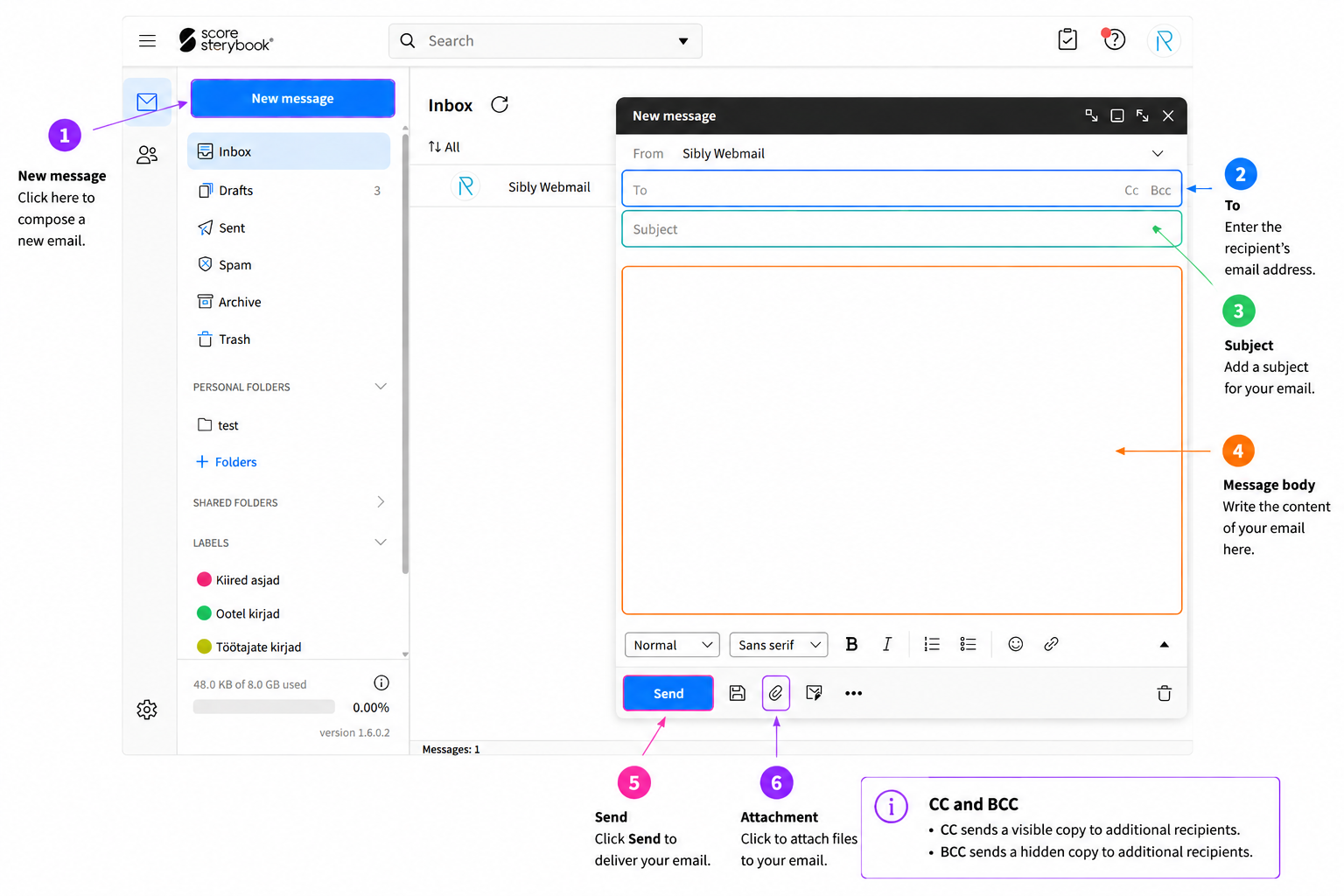
To compose a new email:
- Click New message
- Enter the recipient's email address
- Add a subject
- Write your message
- Click Send
¶ CC and BCC
- CC sends a visible copy to additional recipients.
- BCC sends a hidden copy to additional recipients.
¶ Adding Attachments
You can attach files to your messages.
To add an attachment:
- Click the attachment button
- Select your file
- Wait for the upload to finish
- Send your message
Common supported file types include:
- DOCX
- XLSX
- JPG
- PNG
- ZIP
Attachment limits may vary depending on your webmail package.
¶ Organizing Your Mailbox
Keeping your mailbox organized makes it easier to find important messages.
¶ Creating a Folder
- Click on + Folders in folder list
- Enter a folder name and parent folder (path) if preferred
- Save
¶ Moving Messages
You can drag messages into folders or use the Move To option from the toolbar.
¶ Searching for Emails
Use the search bar to quickly locate messages.
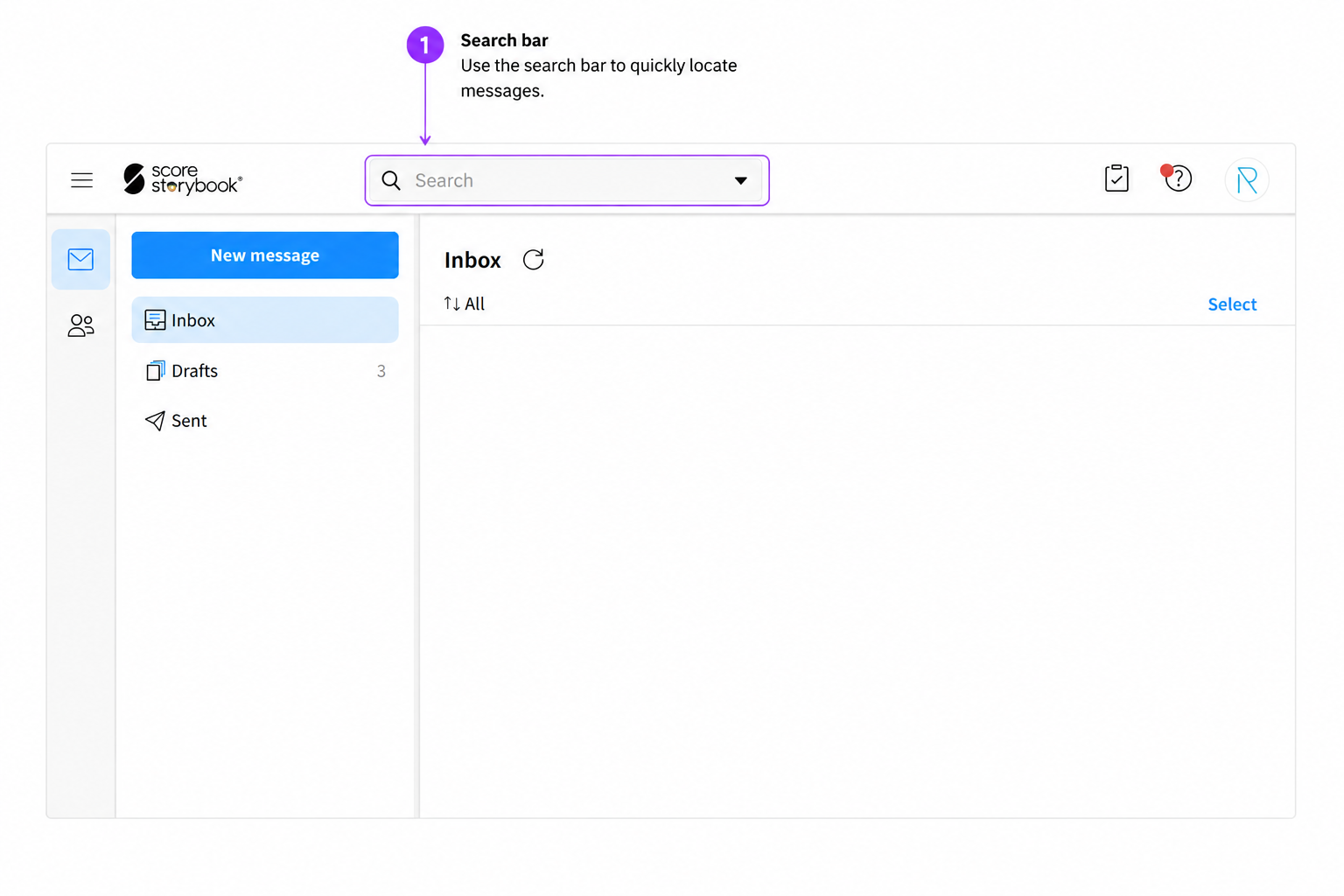
You can search by:
- Sender
- Recipient
- Subject
- Keywords
- Attachment names
¶ Managing Contacts
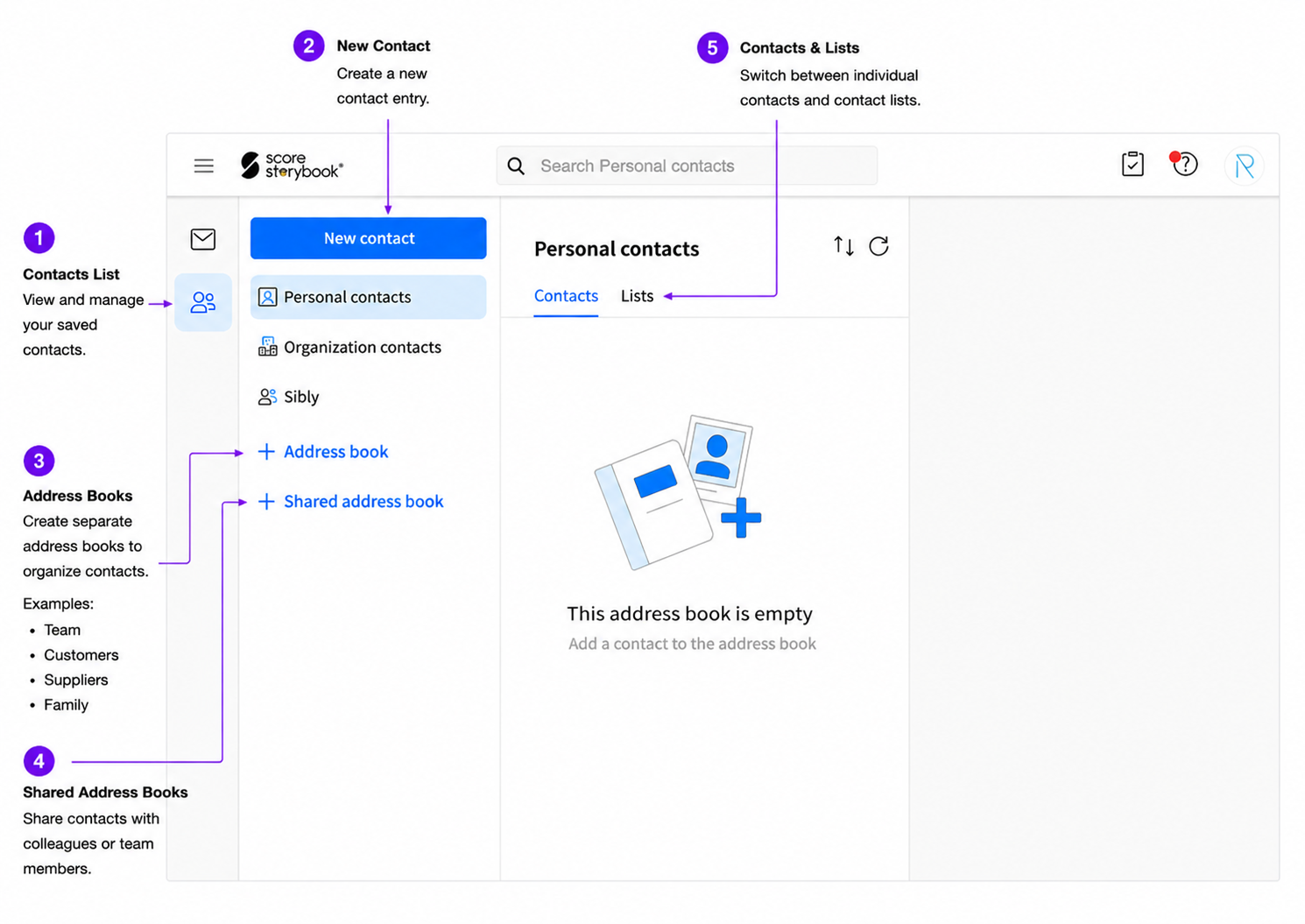
The Address Books feature allows you to save contact information and organize contacts into separate address books.
¶ Adding a Contact
- Open Contacts
- Click New Contact
- Enter the contact details
- Save
¶ Creating Address Books
Address books help keep contacts organized.
Examples:
- Team
- Customers
- Suppliers
- Family
¶ Shared Address Books
Shared address books allow multiple users to access and maintain the same contact list.
This is useful for:
- Company contacts
- Support teams
- Sales teams
- Shared customer lists
¶ Creating an Email Signature
An email signature is automatically added to outgoing messages.
To create a signature:
- Open Settings
- Select Signatures and Identities
- Edit your email identity
- Enter your signature
- Save your changes
Example:
John Smith
Sales Manager
Example Company
+372 5555 5555
john@example.com
For detailed information about creating email signatures see Identities and Signatures
¶ Changing Your Password
To improve account security, change your password regularly.
- Open Settings
- Select Password
- Enter your current password
- Enter your new password
- Save
For detailed information about changing your password see Changing Your Password
¶ Password Recommendations
Use:
- At least 12 characters
- Uppercase letters
- Lowercase letters
- Numbers
- Special characters
Example:
S!bly2025Secure#
¶ Security Tips
To keep your account secure:
- Use a strong password
- Do not share your password
- Log out on shared computers
- Be cautious of suspicious emails
- Verify links before clicking
Never:
- Enter your password on unknown websites
- Share passwords through email
¶ Frequently Asked Questions
¶ Why can't I log in?
Check:
- Email address spelling
- Password accuracy
- Caps Lock status
If the issue persists, contact support.
¶ Why am I not receiving emails?
Check:
- Spam folder
- Mailbox storage limits
- Email forwarding rules
¶ Can I access my email from a phone or desktop application?
Yes. Sibly Webmail supports standard email protocols and can be configured in:
- Microsoft Outlook (new version)
- Microsoft Outlook (Classic version)
- Gmail
- Mozilla Thunderbird
- iPhone
- Android
¶ Need Help?
If you need assistance, please contact us.
When requesting support, provide:
- Your email address
- A description of the issue
- Any error messages
- Screenshots if available
This helps us resolve your issue more quickly.
Thank you for using Sibly Webmail.